Validator Tools for Ethereum validator operators.

Validator Tools is a local-first desktop GUI for Ethereum validators and 32+ ETH stakers on Linux, macOS and Windows. It combines EIP-7002 exits, EIP-7251 consolidations, withdrawal routing, MEV-Boost and relay policy, credential changes and monitoring into clear, repeatable workflows instead of one-off scripts, dashboards and spreadsheets.

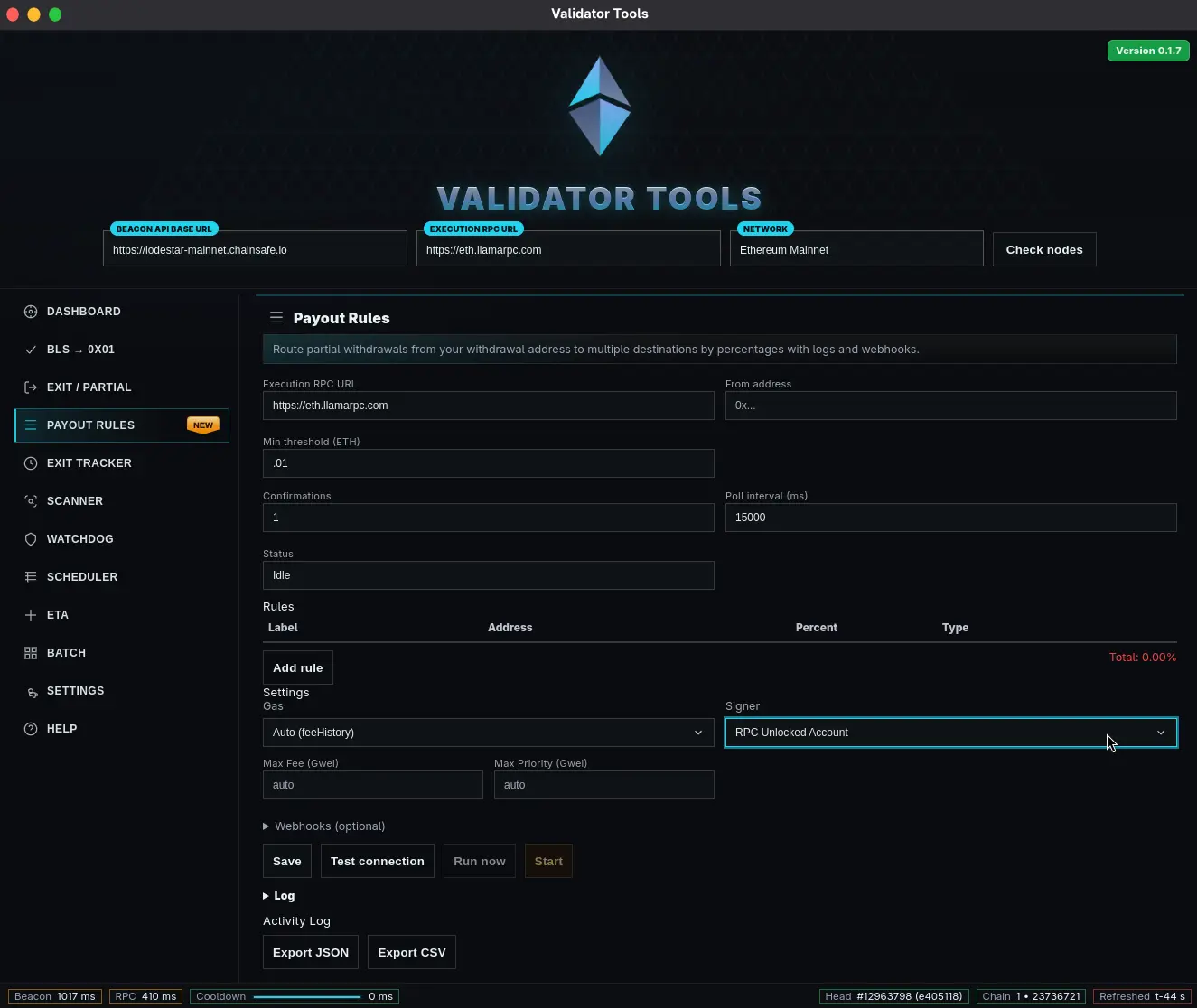
Validator Tools desktop interface
Validator Tools desktop GUI
Desktop operations layer for Ethereum validators on Linux, macOS, Windows. Provides EIP-7002 exits, EIP-7251 consolidations, withdrawals, MEV-Boost policy/monitoring in one GUI with rehearsal mode and full history.
Nethermind
Lighthouse
Prysm
Teku
Nimbus
Lodestar

WHAT CHANGES WHEN YOU START USING VALIDATOR TOOLS

Validator Tools sits between your validator clients and your signing setup as a desktop GUI “combiner”. Exits, partial withdrawals, consolidations, credential changes and MEV policy become structured runs with inputs, checks, rehearsal, signing and execution instead of one-off scripts and spreadsheets. You get queue-aware automation with fee caps and retries, Safe / HSM-friendly signing lanes and optional 7702 session keys, plus exports, webhooks and explorer widgets for stakeholders — whether you run a few solo validators or a larger operator cluster.

DOWNLOAD VALIDATOR TOOLS

Local-first desktop GUI builds for Linux (AppImage), macOS and Windows. The option matching your platform is highlighted.

NEW FEATURES IN VALIDATOR TOOLS

  • Queue-aware 7002 / 7251 scheduler Plans exits, partial withdrawals and consolidations around withdrawal and exit queues, gas ceilings and safety stops, with runs you can rehearse before touching mainnet.
  • MaxEB consolidation advisor Supports MaxEB migration plans with APR, operational cost and risk views, so consolidations across providers or clusters remain deliberate rather than rushed.
  • Safe / HSM-friendly signing lanes Keeps signing strictly separated: the app prepares unsigned payloads, you sign in Safe or your preferred signer, then Validator Tools executes and records the run.
  • MEV / relay policy designer Helps structure MEV-Boost and relay policies per cluster with clear guardrails, change history and pre-flight checks before shipping new configurations.
  • High-throughput withdrawal scanning Scans 0x01 withdrawal addresses and validator indices with per-block summaries, exports and alert-ready outputs for operators, accounting and reporting.
  • Live ops board for clusters Surfaces queue depth, signer status, pending requests and MEV relay health per cluster so operators always see which runs need attention and who changed what.
Overview of recent Validator Tools updates and modules

Operational layer around your validators

Validator Tools runs next to your beacon and validator clients as a desktop GUI operational layer. It plans and rehearses EIP-7002 exits, EIP-7251 consolidations, BLS→0x01 transitions and payout runs, then hands signed payloads to the network through the signing stack you already trust.

Stack
Validator clients
Lighthouse · Teku · Prysm · Nimbus · Lodestar
Operational layer
Validator Tools desktop GUI
Plans runs · models queues & fees · keeps history
Signing
Local signer / Safe / HSM
Prepare → sign → execute · 7702-friendly
Network
Beacon & execution layer
Queues, balances, inclusion · mainnet + Holesky
Automation & queues

Queue-aware, programmable runs

  • Queue-aware scheduling for 7002 exits and partial withdrawals with fee caps, pause / resume and reads from 7002/7251 fee getters so large runs stay predictable.
  • ETA modelling that combines protocol constants with live queue depth and chain load to give realistic windows instead of single-point “best guesses”.
  • Ordering and bounded concurrency controls so batches of validators progress in a controlled way rather than competing with one another.
Signing & safety

Tight boundaries around signing

  • Builds BLS→execution (0x00→0x01), partials, exits and consolidations as unsigned payloads and keeps them local until you hand them to your signer.
  • Safe / Gnosis and HSM-style flows with explicit prepare → sign → execute stages for 7002/7251, matching existing reviews and approvals in your team.
  • No key persistence by default; optional, scoped 7702 session keys for well-defined operations with expirations instead of broad, long-lived access.
Economics & visibility

MaxEB, payouts and state in one view

  • MaxEB consolidation planning (7251) with APR and operational cost views so you can reason about risk, rewards and validator count before committing.
  • Scheduled top-ups and payout rules that route partial withdrawals with tagging, audit logs and ceilings for operators, solo stakers and delegators.
  • High-throughput withdrawal scanning and export across Lighthouse, Teku, Prysm, Nimbus and Lodestar, plus explorer-style widgets and JSON/CSV outputs.

FREQUENTLY ASKED QUESTIONS

Short, practical answers on how Validator Tools fits into your validator workflow, how it interacts with your signing setup, and what to expect around exits, partial withdrawals and consolidations for 32+ ETH stakers and larger operators.

Setup Footprint & networks

Is Validator Tools online or local-first?

It runs locally on your machine as a desktop GUI. The app talks only to your beacon and execution endpoints and to your chosen signing path. There is no hosted backend and no telemetry by default; secrets remain under your control unless you explicitly opt in to something different.

Which networks and clients are supported?

Validator Tools targets mainnet and Holesky with full flows for EIP-7002 and 7251. It works with Lighthouse, Teku, Prysm, Nimbus and Lodestar through standard beacon and execution endpoints; configuration lives alongside your existing node setup.

Can I run Validator Tools on a separate workstation while my nodes run on servers or in the cloud?

Yes. The app only requires network access to your beacon and execution-layer RPC endpoints. You can run it on a dedicated operations workstation or laptop and connect to nodes over your own VPN, SSH tunnels or firewalled interfaces, as long as those endpoints remain under your control.

What access does Validator Tools need to my infrastructure?

Validator Tools talks to a single beacon API endpoint and a single execution-layer RPC endpoint. It does not need shell access to your machines or direct access to data directories; it uses standard HTTP APIs to read validator state, queue metrics and to submit signed transactions when you choose to broadcast them.

Does it work with authenticated beacon / RPC providers or only local nodes?

It supports both. Beacon endpoints can be configured with bearer tokens, X-API-Key headers or query-parameter authentication, and execution endpoints follow whatever authentication your node or provider uses. You stay in control of which hosts and credentials the app is allowed to talk to.

How heavy is Validator Tools in terms of CPU, RAM and disk usage?

The app does not run a consensus or execution client and normally consumes far fewer resources than your EL/CL stack. Most of the load comes from short bursts of API calls during withdrawal scanning or batch runs; these are bounded and can be tuned in the settings if you need to be conservative with resources.

Where are configuration and run history stored, and how can I back them up?

Configuration, connection details and run history are stored locally in the application data directory on the machine where you run Validator Tools. You can include this directory in your usual backup process; restoring it on another workstation brings back your views and history, but not any validator keys, which remain in your existing signing setup.

Can I use Validator Tools with multiple environments or clusters at once?

Yes. You can configure separate sets of endpoints for different environments, such as “mainnet primary”, “mainnet backup” or “Holesky lab”, and switch between them inside the app. Each run is tied to the currently selected environment so you can keep operational workflows for different clusters clearly separated.

Safety Keys & signing path

Does Validator Tools ever handle my signing keys?

No. Validator Tools prepares unsigned payloads for BLS→execution (0x00→0x01), exits, partial withdrawals and consolidations. Signing stays where you keep it today — a local signer, Safe or HSM-style setup.

Can I keep signing as a fully separate step?

Yes. Flows are explicitly structured as prepare → sign → execute. You can export payloads, have them signed elsewhere, then feed signed transactions back to Validator Tools for submission, tracking and history.

How does Validator Tools help avoid slashing and double-signing?

It operates above your validator clients and slashing-protection database. BLS→Execution changes, exits, partial withdrawals and consolidations are built as explicit offline payloads against current beacon state, then handed to your existing signing path. The app never runs a validator, never signs on its own and does not replace standard slashing protection or DVT safeguards you already have in place.

What happens if the app or my machine fails while a run is in progress?

Runs are recorded locally with per-transaction status. If the app is restarted, it refreshes the on-chain state from your beacon and execution endpoints and lets you see which requests were included, which are still pending and which never left the signing stack. You can then resume, retry or close the run explicitly rather than relying on partial logs.

Does Validator Tools store any secrets or API tokens, and can I lock the UI?

By default it keeps no validator signing keys and no secrets beyond what is needed to reach your endpoints. Access tokens for beacon/RPC providers are stored locally as part of the configuration and never sent anywhere else. You can optionally enable a session lock inside the app so that an operator password is required to reopen an existing session on a shared workstation.

Do I have to use EIP-7702–style session keys, and how are they scoped?

Session keys are optional. When you choose to use them, Validator Tools expects them to be narrowly scoped and time-limited to 7002/7251 system contracts so routine exits, partials and consolidations do not require exposing a broad, long-lived key. If you prefer, you can stay with your existing signer or Safe setup without introducing session keys at all.

How do Safe / multisig flows work with Validator Tools?

The app prepares unsigned 7002/7251 and BLS→Execution payloads and turns them into transactions that can be proposed and approved in Safe or a similar multisig. Once a transaction is executed on-chain, Validator Tools reads back the resulting state from your beacon and execution endpoints and marks the corresponding step in the run as completed, so your operational history matches your governance trail.

How does Validator Tools interact with DVT or external slashing-protection services?

It assumes that double-sign prevention and proposer duties are handled by your validator stack, whether that is a single client or a DVT setup. Validator Tools only plans and submits changes such as exits, partials, consolidations and credential rotations; it does not attempt to coordinate attestations or proposals. This keeps responsibilities separate and lets you continue using whichever slashing-protection and DVT tooling you already rely on.

Runs Exits & withdrawals

How does it improve exit and partial-withdraw workflows?

Instead of bespoke scripts and spreadsheets, exits and partial withdrawals are grouped into runs with defined inputs, checks, queue and fee modelling, signing, execution and export. Queue pressure, retries, fee caps and basic ETA estimates are handled inside the tool.

Does it help with 7251 / MaxEB consolidations?

Yes. Validator Tools lets you plan consolidations, see effective balance and APR impact, and build transactions offline. You can dry-run a plan on Holesky before promoting the same run shape to mainnet to migrate large validator sets more safely.

I currently manage exits and withdrawals with scripts and JSON-RPC calls. Does Validator Tools provide a GUI for EIP-7002 and 7251?

Yes. The desktop app is designed as a control panel for 7002 withdrawals and exits and 7251 consolidations: it discovers fees from the 7002 predeploy, builds the appropriate requests, and schedules them with queue-aware ordering, retries and fee caps. This addresses the need many operators have for a dedicated interface for Pectra-era exit and consolidation flows instead of ad-hoc scripts or minimal launchpad forms.

How are exit and partial-withdrawal ETAs estimated?

ETA modelling combines protocol constants such as MAX_WITHDRAWAL_REQUESTS_PER_BLOCK and TARGET_WITHDRAWAL_REQUESTS_PER_BLOCK with recent load on the withdrawal and exit queues exposed by your beacon node. The result is a time window rather than a single timestamp, which helps set expectations in periods when exit queues are long or network conditions change quickly.

How does Validator Tools handle large batches of validators in one run?

Batch runs use queue-aware ordering, bounded concurrency and per-transaction fee caps. The app prepares 7002 requests for each validator, submits them under configurable concurrency limits, retries where appropriate and records a clear log for every transaction so you can audit which validator was handled when and at what cost.

Can I restrict exits, partials or consolidations to specific maintenance windows?

Yes. Runs can be configured with fee ceilings, basic queue conditions and blackout or maintenance windows, so requests are only submitted when both network conditions and your own operational calendar permit. Outside those windows the run simply waits without generating new transactions.

Can I rehearse a run on Holesky or a local network before executing it on mainnet?

Validator Tools supports “dry-run, record & replay” flows: you can build a plan on Holesky or a local network, execute it there to verify behaviour, and then reuse the same sequence and parameters on mainnet with diffs and history. Consolidation plans are shown with explicit source and target validators and their post-run effective balances, so you can see how a set such as “A, B, C” will look after consolidating B into A before you submit anything. This is particularly useful for complex MaxEB consolidations or large offboarding runs.

How do withdrawal scanning and payout routing work in practice?

The scanner can traverse recent blocks for consensus-to-execution withdrawals to a given 0x01 address or validator index over a configurable lookback window, with per-block statistics and CSV/JSON export. On top of that you can define payout rules that route partial withdrawals by percentage or fixed amounts to several destinations, with labels and logs that are easy to hand to accounting, reporting or treasury teams.

Docs Runbooks & support

Where can I find full documentation?

Operator runbooks, troubleshooting guides and release notes live in the documentation. They mirror the key flows in the app: exits, partials, consolidations, MEV operations and monitoring.

Is there guidance for larger operators or teams?

Yes. There are dedicated notes for Safe / HSM setups, multi-operator workflows and audit-oriented history exports for stakeholders, accounting and compliance teams that need structured records of validator changes.

Which runbooks are available today?

Documentation mirrors the main flows in the app: BLS→Execution (0x00→0x01) changes, EIP-7002 exits and partial withdrawals, 7251 MaxEB consolidations, payout rules, MEV and relay policy changes, monitoring and withdrawal scanning. Each runbook walks through inputs, checks, rehearsal options and post-run exports.

Are there examples for common scenarios such as solo-staker partial withdrawals or provider migration?

Yes. The docs include worked examples for small solo-staker setups and for larger operator scenarios like phased offboarding, MaxEB-based consolidation across providers and scheduled payout runs. They are written so you can adapt them by swapping in your own endpoint details and validator indices.

How are releases versioned, and how should I approach upgrades?

Each release is published on GitHub with a changelog, and desktop builds are linked from the Downloads page. The recommended pattern is to review release notes, test new versions against Holesky or a small subset of validators, and only then adopt them for production runs on your full mainnet cluster.

Where can I find troubleshooting guidance for protocol-level errors such as “EIP-7002 predeploy not found” or beacon provider throttling?

The documentation and repository include a troubleshooting section that covers common symptoms: wrong network or chain ID, missing 7002 predeploy, beacon providers that limit deep history or concurrent scans, and mismatches between withdrawal addresses and validator records. When an error occurs, the app shows enough detail to cross-reference the relevant entry and adjust your configuration or provider choice.

How can I integrate Validator Tools outputs into monitoring dashboards or explorers?

Runs can be exported as CSV or JSON, and the app exposes REST endpoints and explorer-style widgets for 7002/6110/7251 request and payout state. You can embed these into your own staking explorer, accounting tools or monitoring dashboards so stakeholders see validator activity without needing direct access to the operations workstation.

How do I report a bug, request a feature or raise a security concern?

Operational issues and feature requests can be filed through the project's GitHub issue templates, while security-sensitive findings should follow the instructions in the SECURITY.md file. For general questions that are more about operations than code, the documentation site and support email provide channels that fit better into day-to-day validator workflows.